Pelican RSS Feed and Icons
Adding RSS feeds
If you are using Pelican to do blogging, then you definitely want an RSS feed available for your users. Pelican makes this feature super easy but not enable by default. You will need to go into the pelicanconf.py and make the following changes:
From:
# Feed generation is usually not desired when developing
FEED_ALL_ATOM = None
CATEGORY_FEED_ATOM = None
TRANSLATION_FEED_ATOM = None
AUTHOR_FEED_ATOM = None
AUTHOR_FEED_RSS = None
To:
# Feed generation is usually not desired when developing
FEED_ALL_ATOM = "feeds/all.atom.xml"
CATEGORY_FEED_ATOM = "feeds/{slug}.atom.xml"
TRANSLATION_FEED_ATOM = None
AUTHOR_FEED_ATOM = None
AUTHOR_FEED_RSS = None
After that, when you build your site, you will get new folders “outputs/feeds” that has the xml files to setup the RSS feeds for users. Then just add a link to your site somewhere, I used the social links which automatically had the rss icon available.
Adding Social Icons
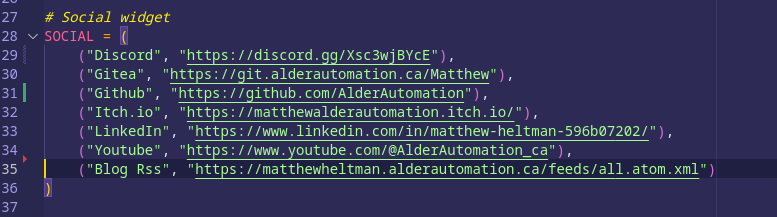
Speaking of icons, Pelican does not come with all of the icons that you may want. In order to add more icons you will either need to make them or find them on the internet. I grabbed mine from the internet since I am not very artistic. For my theme, I found that I had to resize the images to 16*16 to match the existing icons using gimp to scale the image and export. There’s probably a better way of doing this. Once you have the image file sized, add it to your theme>static>images>icons folder. Then update your pelicanconf.py. For example, I needed a youtube icon, so I added ("Youtube", "https://www.youtube.com/@AlderAutomation_ca"), to the social widget section
Adding Favicon
The favicon setup is very similar to the social icons setup. Create a png image in a 512*512 size and place in the theme>static>images>icons folder. Update the theme>templates>base.html head section to include:
    <link rel="icon" href="{{ SITEURL }}/theme/images/icons/favicon512.png" type="image/x-icon">
    <link rel="shortcut icon" href="{{ SITEURL }}/theme/images/icons/favicon512.png" type="image/x-icon">
I put mine above styles but I don’t think it really matters

Congrats!
You should now have a working RSS feed and be able to add more social link icons and add a favicon to your site.
If you have any issues, or if you have any suggestions or requests for upcoming content, feel free to email me or join my Discord.
Up next:
Discord Webhooks.