Learning Pelican
Intro
Today I am learning how to build static sites using Pelican. Pelican uses Python and markdown to generate sites automatically. Everything has been super easy and fast. I went from no site to a basic template in a matter of minutes. Pelican's docs are super clear and easy to understand.
Installation (Fedora)
I run mostly on Fedora, so my instructions will be based on that, and I will not be looking at other systems, but because it is Python based, most of the instructions are going to be fairly similar after Python is installed. To install Pelican, you first need Python & Pip installed. Fedora comes with latest Python installed but not pip (I thought that was a weird choice)
sudo dnf install python3-pip
Once that is installed, we can install Pelican and its Markdown dependency
python -m pip install "pelican[markdown]"
Creating First Site
Now that we have everything installed, we can create a site. In my examples, I am going to use some generic folders; you use whatever folders you want to use.
mkdir -p ~/pelican_projects/first_site makes a project folder and a site folder in your home directory
cd ~/pelican_projects/first_site changes into that folder
pelican-quickstart this starts the quickstart wizard/questionnaire
The questionnaire should be straight forward:
$ pelican-quickstart
Welcome to pelican-quickstart v4.11.0.post0.

This script will help you create a new Pelican-based website.

Please answer the following questions so this script can generate the files
needed by Pelican.


> Where do you want to create your new web site? [.]
> What will be the title of this web site? First Site
> Who will be the author of this web site? Matthew
> What will be the default language of this web site? [en]
> Do you want to specify a URL prefix? e.g., https://example.com   (Y/n)
> What is your URL prefix? (see above example; no trailing slash) https://firstsite.com
> Do you want to enable article pagination? (Y/n)
> How many articles per page do you want? [10]
> What is your time zone? [Europe/Rome] America/Vancouver
> Do you want to generate a tasks.py/Makefile to automate generation and publishing? (Y/n)
> Do you want to upload your website using FTP? (y/N)
> Do you want to upload your website using SSH? (y/N)
> Do you want to upload your website using Dropbox? (y/N)
> Do you want to upload your website using S3? (y/N)
> Do you want to upload your website using Rackspace Cloud Files? (y/N)
> Do you want to upload your website using GitHub Pages? (y/N)
Done. Your new project is available at /home/picard/projects/firstsite
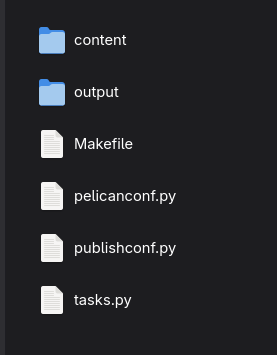
I used mostly default values because that worked for me. You will need to adjust answers to fit your needs. This should generate a folder structure within your firstsite directory:
Your First Post
In that content folder, we are going to make your first post to the website. Go ahead and create a file in that folder, let's call it first_post.md. I'll let you decide how you want to do this (can remain in command line, do in file explorer, or code editor). These are markdown files, and it seems like all markdown syntax works within these files. In the file we are going to put in a starter template from the Pelican website:
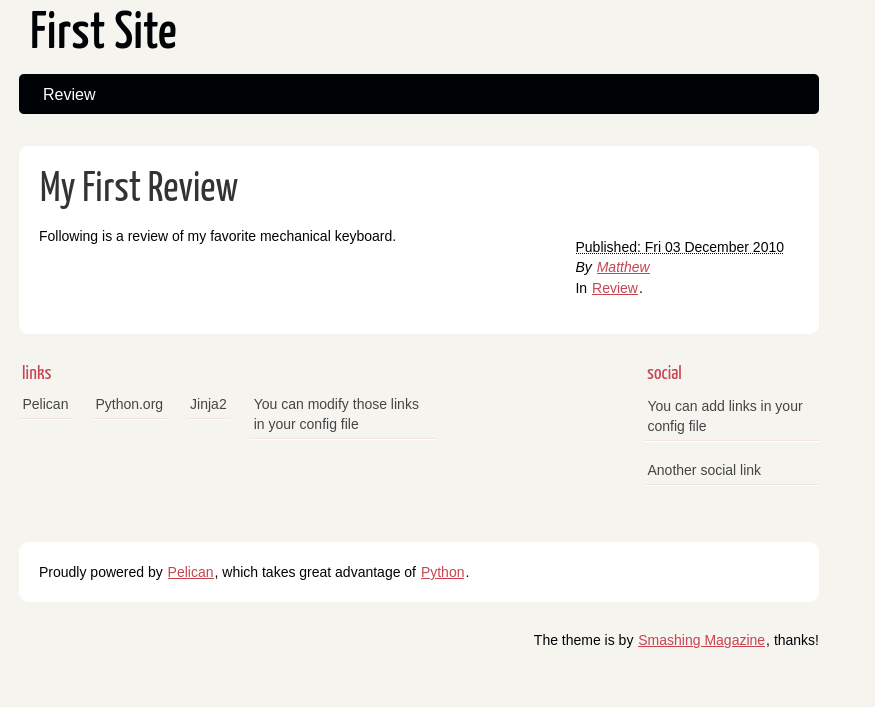
Title: My First Review
Date: 2010-12-03 10:20
Category: Review

Following is a review of my favorite mechanical keyboard.
The "header" of this file contains the attributes of the file, and they allow Pelican to build the site according to those. Within the Pelican docs, you can find a whole slew of useful attributes to use on your content. The bottom part is the content of the post itself.
Previewing Your Site
Now we can go back to the command line and enter:
pelican content generates the output files
pelican --listen runs the server on localhost:8000
Now open a browser and navigate to http://localhost:8000 you should see the website we just built.
Congratulations! You did it!
If you have any issues, or if you have any suggestions or requests for upcoming content, feel free to email me or join my Discord.
Upcoming Posts:
Pages vs Content
Theming